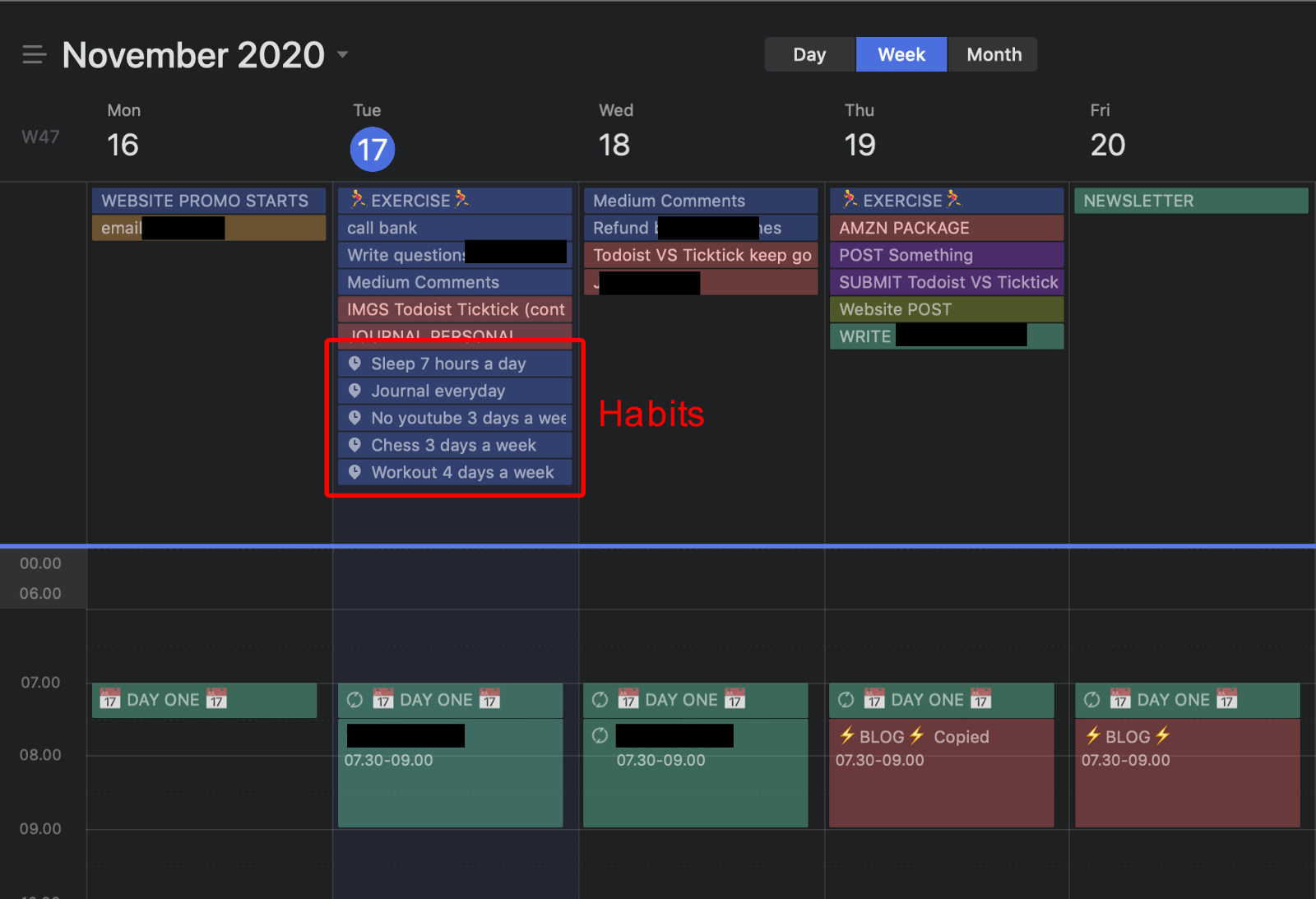
You might be surprised to see that the Todoist calendar is in fact a Google Calendar. That’s because the app still (after many feature requests) doesn’t have a built-in calendar view. The way it works is by connecting it to your Google Calendar, and syncing your tasks from inside the app. This causes various issues.
First, syncing delays. If you like shuffling your tasks around like I do, trying out different ways of organising, Todoist won’t keep up. There is a delay (that can be pretty long) to refresh both the Todoist tasks list and the Google Calendar, it’s not efficient or user friendly at all.
Second, there is no way to check off an item from Google Calendar. If I have a task set for 10am on Friday and I’m done with it at 10:30am, then I’ll want to check it off. But when I planned for this task I set it to last for 1 hour, so now it’s still showing in my calendar. If I delete it, well it will be gone, it won’t count as done. So I have to go in Todoist and check it off, and this might conflict with the duration of the event in Google Calendar.
Third, it creates a mix of Google Calendar meeting events and Todoist tasks, which quickly becomes impossible to manage. I use Google Calendar at my office job, and my own app for my personal work. So I need 2 completely independent systems. Sure, I could log out of my office Google Calendar and login to my personal one, to then set up Todoist to sync with this one and not the other one, but it’s just a hassle. It would be much better if Todoist had its own dedicate calendar module.
TickTick has that, and it’s honestly the best thing since sliced bread. The TickTick calendar doesn’t use any external third party to integrate. It’s inside the app, and it won’t conflict with my Google Calendar from the office.
When I move a task around in my TickTick calendar, it gets updated instantly in the various lists across my account, there’s no delay. I can choose to have tasks set as 2 types of events in the calendar:
- Normal task: something to do on a given day but not at a given time.
- Events: something to do on a given day, at a given time, with a deadline.
Normal tasks show up at the top of the day in a separate section, and events display like in a normal calendar.









18 Comments
Great comparison, but you missed a few things!
What Todoist also does better:
– Lets you quick add to sections and shows the project AND section name in lists like Today.
– Lets you add an ‘add task’ widget on your iPhone.
– Has a discount for non-profit workers as well education (TickTick is education only)
What TickTick also does better:
– Has a notes field as well as comments. Todoist does not.
– Has a lot more colours and also lets you choose ‘no colour’ if you prefer for lists or tags.
– Has nested tags.
– The templates really don’t work the same at all – Todoist has templates for projects (ie lists), TickTick has individual task and note templates.
– Has a percentage indicator (automatic on tasks with checklists or you can slide it across manually)
– Has a ‘plan your day’ feature
– Rememebers your sorting choices and applies them to new tasks that you add
Hey Gashlycrumbles! Thanks a lot for pointing those out, it’s always great to get insights from people who read my content and have tested the tools themselves! I may release an update to this article in the future, keeping up with updates and new releases is important! Thanks again for your feedback, and have a great day!
Hi Joseph! It is a comprehensive comparison between those apps. Right now, I am struggling use the any do because of their calendar system is very weird, so looking for the alternatives to switch. After reading your articles, I think I am going to choose ticktick over my any do. Again, thank you for giving a comprehensive comparison.
Hey Lawrence, thanks so much for your comment, and I’m glad you were able to find value in my content! I wish you great success whatever tool you choose to use in the end, have a great day!
very helpful review. thanks.
Hey Rob! Thanks a lot for your feedback, it means a lot! Hope you have a great day!
This is what a review should look like. Wow. Super thorough, feature by feature. I’m a big fan of Todoist, and I would have liked to see the integrations comparison because Todoist has to win hands down (not including third party apps like Zapier, but maybe then too). But, my huge grievance with Todoist is not having a native calendar, so I had switched to 2Do. And I loved 2Do but when they lost the CalDav integration, it led me to looking for a replacement. This definitely makes me ready to give TickTick a try. I wonder if they have geofencing built in, which I use like once a year but I think is pretty cool.
Hey Tanya! I totally agree with you that the fact that Todoist (and many other productivity apps) doesn’t have a native calendar feature is a big roadblock in terms of productivity. In terms of integrations, as you point out these days Zapier makes very easy to connect so many apps together, so it must be kind of even there. I’m not sure about the geofencing option you’re mentioning, but you can also send feature requests to the Ticktick team! Thanks a lot for your comment and for taking the time to check out my content, have a great rest of your day!
I have been going back and forth between TickTick, Todoist, and Memorigi. Though Todoist and Memorigi look better visually, I feel that functionally TickTick beats the other two. I wish that the developers of TickTick would hire a really great designer to make the app look more up to date and include Material You coloring while they are at it.
Hey Shelly! I hadn’t heard about Memorigi, it does indeed look pretty cool. I think you’re right, Ticktick has so many features that it usually beats the competition, even if the design is still not up there. Thanks a lot for your feedback, hope you have a great day!
Awesome comparison! Thanks so much for this! One thing though: TickTick can create TASK templates (save your task as a template) whereas Todoist only allows you to save a “project” (or list) as a template as far as I know.
Hey Willow! Thanks a lot for your kind words, it means a lot, and I’m glad you found value in my article!
You have beautifully explained, Brother. I literally haven’t seen such a deep and detailed comparison.
I am now definitely going to tick-tick. And leaving Todoist behind.
Thanks, once again.
Hey there! Thanks a lot for your kind words, it means a lot! I hope you’ll love Ticktick as much as I do, and I wish you a great rest of your day!
One thing that should be mentioned between the two apps is the attachments and size capability. I regularly save PDF documents and pictures to my tasks so I have a quick place to refer back instead of combing through emails. I also need the ability to use multiple devices to use at the same time.
The last time i checked (over a year ago), TickTick file size was capped at 10mb per file (Todoist allowed 20mb). Tickick was capped with the number of files you can upload (no limit on Todoist). Things3 doesn’t even allow attachments (they allow a URL, but you can only access from your computer and not the phone).
Every year, I keep comparing the three apps trying to choose my “winner”. In a perfect world, I would like to have an app with the look of Things3, the functionality of TickTick and the attachment limits of Todoist. Unfortunately, my reality is to keep using Todoist solely based on file size attachment capability.
Hey Beau, I have good news for you! Ticktick now allows you to upload files up to 20mb in size to attach to your tasks, just like Todoist! I’m not sure when this was released but I just tried and it worked. Thanks a lot for your feedback and for checking out my content, and I hope you have a great rest of your day!
Thanks for this, Joseph, it’s really helpful. Another important aspect is the update mechanism. I like that the Todoist self-updates and TickTick requires each update to be manually installed. This becomes a problem if you don’t have continuous local admin permission on your device from office.
Hey Vijay, thanks a lot for your comment! I personally prefer manual updates because I generally don’t need that many updates, although I wouldn’t weigh in that factor to rate both apps. I read the changes log and see if it will provide value and/or increase security, and if it doesn’t I skip it. But of course, if you like to have the latest version of an app every time it comes out, I understand your preference for Todoist! Thanks again for your feedback and have a great day!